
Every one of your customer’s channels in a single conversation
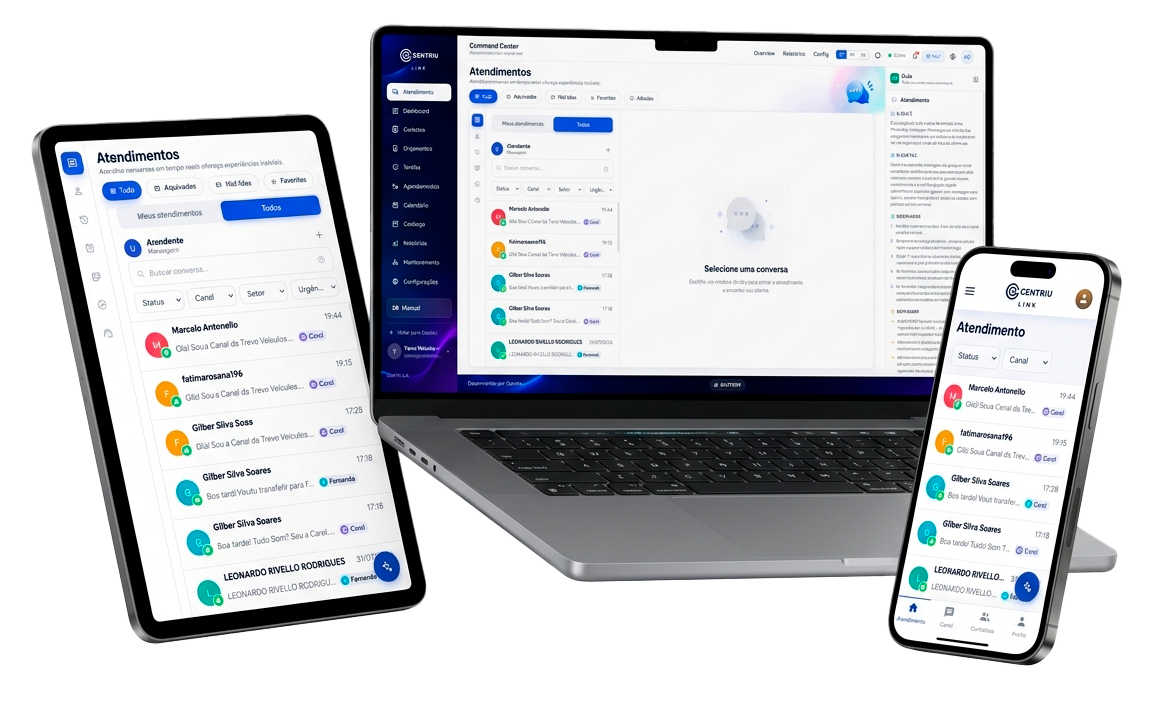
WhatsApp, Instagram Direct, Messenger, your website widget and the company Gmail arrive in the same inbox. With a single queue, routing, SLA, tags and one history per customer, your team serves from one place — and an AI assistant helps up to the plan limit and hands off to a person when needed.
Five real channels · A single queue with routing · SLA, tags and one history per customer · AI that hands off to a human
Service turned into a race between tabs
Your customer talks across several channels and your team replies on several screens. Without a single inbox, messages get lost, conversations end up with no owner and every interaction starts from scratch.
Each channel in a different tab
WhatsApp in one place, Instagram Direct in another, Messenger and the website chat in two more. The team switches screens all the time and a message always slips through.
No one knows whose conversation it is
With no queue or routing, two people reply to the same customer — or everyone assumes someone else already replied, and no one does.
The history gets lost
With each contact, the agent starts from scratch: they don’t know what was already said, on which channel, or what the deadline is. The urgent falls behind with the rest.
From scattered channels to a conversation under control
Link does not promise to serve for you or to answer everything on its own. It changes the starting point: your customer’s real channels arrive in a single inbox, with a queue, SLA, tags and history — and an AI that helps up to the plan limit and hands off to a person when needed.
“Service stops being a race between tabs and becomes a single inbox, with context and deadlines under control.”
A service inbox, from the channel to the record
Six capabilities Link actually delivers — without promising a bot that handles everything on its own.
A single inbox
WhatsApp (by QR Code or through Meta’s official API), Instagram Direct, Messenger, your website widget and the company Gmail arrive on the same screen — every conversation with its source channel always in view.
A single queue and routing
Conversations enter a queue and are distributed by round-robin routing to the right agent, with no two people on the same conversation.
Response SLA
First-response and resolution targets tracked in real time, with an alert before the deadline is missed — and a pause when the conversation is awaiting the customer.
Tags and organization
Tag, filter and prioritize conversations by topic or stage. Tags can also be applied automatically by routing rules.
One history per customer
Each contact gathers conversations from every channel into a single profile, even when the customer switches channels — the agent sees the context before replying.
AI assistant with human handoff
An AI assistant replies based on the configured knowledge, up to the plan limit, and hands the conversation to a person when the customer asks, the topic is sensitive or the allowance runs out.
Want to see Link applied to your service operation?
Talk to a specialistThe message’s path, from the channel to the agent
The message arrives through a real channel, lands in the single queue and is routed to whoever will reply — a person or the AI assistant. In the end, everything is recorded in the customer’s history.
1 · The real channels come in
WhatsApp, Instagram Direct, Messenger, your website widget and the company Gmail arrive in the same inbox, with the source channel always in view.
2 · A single queue and routing
The conversation enters the queue and round-robin routing distributes it to the right agent — or to the AI assistant.
3 · The conversation under control
The SLA runs, tags organize and the customer’s history sits alongside, so you reply with context.
Human handoff
The AI assistant replies up to the plan limit and hands the conversation to a person when needed — the conversation is never left without an owner.
The channels are these five — WhatsApp (by QR Code or through Meta’s official API), Instagram Direct, Messenger, a web widget and Gmail. The AI assistant operates up to the plan’s allowance; it is not a bot that handles everything on its own.
From the message to the record, with the human handoff at the center
An illustrative example of the real Link flow — it includes the point where service passes to a person. No real company, data or numbers.
From the message to the record, step by step
IllustrativeMessage arrives
The customer writes through one of the real channels: WhatsApp, Instagram Direct, Messenger, the website widget or the company Gmail.
Single queue
The conversation enters the single inbox, with the source channel in view.
Round-robin routing
The queue distributes the conversation to an agent — or to the AI assistant.
The AI replies
Within the plan limit, the assistant replies based on the configured knowledge.
Handoff to a human
When the customer asks for a person, the topic is sensitive or the plan’s AI allowance runs out, an agent takes over — and the conversation is never left without an owner.
Reply sent
The reply goes out with the message status, a tag applied and the SLA running.
History recorded
Everything stays in the customer’s single history, with an audit trail for future reference.
Flow: the message arrives through a real channel; lands in the single queue; round-robin routing to an agent or the AI assistant; the AI replies up to the plan limit; handoff to a human (control point); reply sent with a tag and SLA; customer history recorded.
Operations where the conversation cannot be lost
Link is for teams that serve customers by message and need channel, queue and deadlines under control.
Customer service and support desk
Centralize the channels in one inbox, distribute with a queue and routing, and track the SLA — without leaving a message unanswered.
Sales over WhatsApp
Reply fast, with the customer’s history alongside, while the sending queue paces the rhythm to keep the number healthy.
Support and after-sales
Organize with tags, prioritize by SLA and hand the conversation to the right person without losing the context.
E-commerce and services
Handle the volume of questions from several channels in one place, with one history per customer and AI helping with triage up to the plan limit.
AI-assisted service, but under human control
Link is clear about what the AI does and where it stops. The person stays in charge — and every conversation is recorded.
A guaranteed human handoff
The AI assistant transfers the conversation to a person when needed and never leaves service without an owner.
AI up to the plan limit
The AI replies up to the plan’s AI allowance. On reaching the limit, it pauses and service continues with a person — with transparency about the allowance.
History and audit trail
Conversations stay in the customer’s single history, and actions, tags and SLA are recorded for reference.
Privacy and LGPD
Each organization has its data isolated, with data-subject export and deletion under the LGPD.
Link isolates data per organization and AI usage respects an allowance per organization. When the allowance runs out, the AI pauses and human service takes over — messages keep arriving in the inbox.
System plans
Three tiers that unlock more as you grow. On Max, you get access to everything.
Essentials to start
- Unified inbox across all channels
- WhatsApp, Instagram Direct, Messenger, website widget and Gmail in one place
- Tags and conversation segmentation
- Transfer to another agent with a note
Full operation
- Unified inbox across all channels
- WhatsApp, Instagram Direct, Messenger, website widget and Gmail in one place
- Tags and conversation segmentation
- Transfer to another agent with a note
- AI-generated quick replies
- Immediate context with Orbit (CRM) data
- Performance reports: AHT, CSAT and volume
Everything unlocked
- Unified inbox across all channels
- WhatsApp, Instagram Direct, Messenger, website widget and Gmail in one place
- Tags and conversation segmentation
- Transfer to another agent with a note
- AI-generated quick replies
- Immediate context with Orbit (CRM) data
- Performance reports: AHT, CSAT and volume
- Automatic round-robin distribution
- First-response and resolution targets with a compliance report
- Permissions that mirror your hierarchy
Frequently asked questions
What is Centriu Link?
It is Centriu’s omnichannel service inbox. It brings WhatsApp, Instagram Direct, Messenger, your website widget and the company Gmail into a single queue, with routing, SLA, tags and one history per customer. An AI assistant replies up to the plan limit and hands the conversation to a person when needed.
Which channels does Link connect?
Five real channels: WhatsApp, Instagram Direct, Facebook Messenger (via Meta), your website chat widget and the company Gmail. WhatsApp connects in two ways: by QR Code or as WhatsApp Official, through Meta’s cloud API. They all land in the same inbox, with the source channel always in view. These are the channels connected today.
How does the WhatsApp connection work?
In two ways: by QR Code, like WhatsApp Web, or as WhatsApp Official, through Meta’s cloud API. Each number has a sending queue with a human pace, designed to keep the account healthy at high message volume.
Does the AI reply on its own all the time?
No. The AI assistant replies up to your plan’s limit (its AI allowance) and hands the conversation to a person when the customer asks for a human, the topic is sensitive or it does not have a safe answer. When the allowance runs out, the AI pauses and human service takes over — messages keep arriving in the inbox.
Can several agents serve at the same time? How are conversations distributed?
Yes. Conversations enter a single queue and are distributed by round-robin routing, with no two people replying to the same contact. Each agent sees what is theirs, with the customer’s full history alongside.
Are there SLA, tags and a history per customer?
Yes. You define first-response and resolution targets, and Link tracks them in real time, warning before the deadline is missed (and pausing when the conversation is awaiting the customer). Conversations are organized with tags, and each contact gathers conversations from every channel into a single history.
What is the difference between Link and Care?
Both centralize service channels, and the public definitions overlap — we won’t invent an exact distinction here. Which one fits better depends on your operation: how the team serves, the volume and what you need to record. The best path is to talk to our team to design the right fit.
What about deployment, data and the LGPD?
Deployment is in your Centriu account, which isolates data per organization: each organization has its data isolated. Actions stay in an audit trail, and there is data-subject export and deletion under the LGPD.
Put your service into a single inbox
Connect WhatsApp, Instagram Direct, Messenger, your website widget and the company Gmail, with a queue, SLA, tags and one history per customer — and an AI that hands off to a human when needed. Request a demo and see Link applied to your operation.